Friday, 10 March 2017

Coconut Iced Mocha Macchiato


Make your own delicious Drink "Coconut Iced Mocha Macchiato" at home with this easy recipe method!

Recipe type: coffee (Drink)

Time: 5 Minutes only


Ingredients:
  • 1/4 cup chilled double strength brewed coffee or 1 shot espresso
  • 1/2 cup carton coconut milk
  • 1 tablespoon Silk Vanilla Almond Milk Creamer
  • Few drops vanilla stevia or 1 tablespoon coconut sugar (or sugar of choice)
  • 2 tablespoons organic chocolate syrup
  • Ice


Directions:


  • Brew your coffee if you do not have done so yet. Place in freezer to chill while making remaining drink.
  • Fill a tall glass 3/4th with ice. Add coconut milk, creamer and stevia. Stir.
  • Slowly pour chilled coffee on top.
  • Drizzle with chocolate syrup.
  • Drink Taste with Enjoy!


The milk and espresso literally melt together to create a perfect blend.

The new macchiato is full of chocolate and coffee goodness with a hint of coconut flavor. Instead of using milk and caramel they use a chocolate sauce and coconut milk. You still get the same “stained milk” effect as the original and it is just as delicious!

Wednesday, 8 March 2017

Generate and activate your EPF UAN

Every individual employee who has a provident fund account is allotted a unique account number by the Employee Provident Fund Organization or EPFO. UAN allows you to access, check and withdraw from your Provident Fund account without any interference from your employer.

Below are the steps to get started with your UAN:

Step 1 – Get relevant PF details from your employer

Ask your employer for your UAN. EPFO allots the UANs of all employees to the employer. If your employer does not provide you with the UAN, don’t worry. Note down your Provident Fund number which you can find on your payslip. If the PF number is missing, ask the HR person for it.

Step 2 – Check your UAN Status

UAN allows you to access, check and withdraw from your Provident Fund account without any interference from your employer.

If you know your UAN then you can check if the same has been activated. But if you do not have the UAN you can check if you have been allotted one by EPFO and generate one in case it has not been allotted.

First, go to http://uanmembers.epfoservices.in/check_uan_status.php

Fill in your state and office area for the EPF. Then enter your PF number, which is bifurcated into Region/ Office/ Establishment Code/ Ext/ PF Number. Your PF number may look something like this KN/BN/364734/000/35772. KN denotes Karnataka, the Region; BN denotes Bangalore, the PF Office; 364734 denotes the Establishment Code, 000 denotes the Ext, and the last number 35772 denotes your PF No. If your PF no. does not have the Ext number, you can leave it blank.

Click the Check Status button. If you get a message that your UAN is activated then it means that the EPFO has allotted you a UAN and has already activated it. If it shows that UAN is not allotted, then generate one.

Step 3a: Generate your UAN
Anyone can generate a UAN, even if you are unemployed or a student about to get a job.

Go to the EPFO website http://www.epfindia.com/site_en/index.php

Under ‘Our Services’ click on the ‘For Citizens’ link.

This page has a link to register for UAN. Click on it.

Fill in your mobile number, your KYC details such as Aadhaar or Passport number, your personal details, your bank details. You also have to upload a photograph and a scanned image of your signature.

Once you have filled in the details, you get an authorization pin on your mobile. Key in the pin and generate your UAN online.

But suppose you have already been allotted a UAN, but you don’t know what it is and are not able to get it from your employer. Then go to step 3b.
Step 3b: Find out your UAN number

If a UAN has already been allotted to you, when you click on Check Status in step 2, you get a message that says ‘a UAN has been allotted for Member ID xxxxx’ (which is your employer’s number). You are then taken to a verification page.

Fill in details for verification – your name, date of birth, mobile number and email ID.

You are then prompted to create a password. Create one.

Then click on ‘Get PIN’.

The PIN is sent to your mobile phone. Enter it on the portal and press submit.

You are then directed to the Check Status page again, where your UAN is printed. The details are sent to you via SMS too. Save the UAN for future use.

Step 4: UAN Activation

While anyone can generate a UAN, you can activate it only after you get your EPF number. If you have your PF number, go to http://uanmembers.epfoservices.in/uan_reg_form.php. Enter your UAN, mobile number and PF account details as explained in step 2.

Authorization PIN is sent to you on your mobile. Submit the PIN to activate your UAN.

After activation, fill in details such as Name, Father’s Name, Date of Birth, etc. You are then asked to create a password.

Your UAN is your username for the portal, and the password is the one you created in the previous step.

Edit your KYC details

After you’ve activated UAN you can edit your KYC details. KYC or Know Your Consumer is a personal identification process which is often mandatory while creating financial accounts. It is best to keep your KYC up-to-date whenever there are changes in your contact details, address or the like. To edit your existing KYC details, you have to find the ‘Edit Your KYC’ link on the EPFO website. You have to upload documents such as Aadhar Card, Pan Card, Passport, or Driving License. You can choose any one of them and scan the document as an image and upload it. Link your Aadhar card and bank account number as that is helpful while making withdrawals from your PF in the future.

Wednesday, 4 January 2017

My Business : Google introduce Tool for Small Business in India

Google India on Wednesday announced key initiatives for the small and medium businesses in India, including a new tool that would help them create and online presence, besides a digital training program.

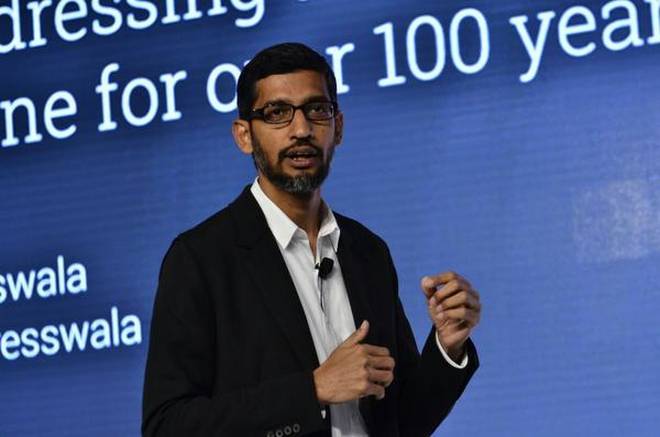
The announcement was made by Google CEO Sundar Pichai, who is in the national capital for a day. Mr. Pichai said the brand new tool — My Business, has been introduced in India first and would be taken to other countries gradually.


Google My Business would help small businesses set up website from their mobile devices. All they need is a smart phone and a few minutes, and “We have learnt that when we solve for a place like India, we solve for everyone around the world,” Mr. Pichai said.

The tech giant also launched Digital Unlocked, an education programme in association with industry body FICCI and Indian School of Business. The programme will impart mobile and online courses to help small businesses.

“SMBs have always been keys users of our platform right from the beginning,” Rajan Anandan, vice-president - India and Southeast Asia, Google said.

He added that businesses with a digital presence see profits grow twice as fast. Additionally, 52 per cent of digital businesses cater to customers beyond their cities compared to 29 per cent of offline ones. “Digital business employ 5 times more employees than offline ones,” he added.

Thursday, 29 December 2016

Your offline data collect on facebook

All are knows that Facebook makes its money through targeted advertisements. By tracking what you look at and click on while using its website, Facebook assembles a detailed profile of you that it uses to figure out what you are interested and tailors its advertising to match. But a recent investigation by propublica. has revealed that the social media company tracks much more than your online activities.

At the heart of the issue is the fact that Facebook buys data from offline sources like retailers, and bundles that data with its own to create more detailed profiles of its users. 

However, unlike Facebook's native data collection, users cannot see what information these third-party sources have on them. This third-party information can include things like your income level, the stores you shop in, and even the number of credit cards you own.

Unlike Facebook's own data collection, the company provides no way to opt out of this service. According to Facebook, the only way to remove this personal information from their databases is to go through the third-party providers individually, which is a time-consuming and often impossible task. Facebook also regularly changes providers, which means you'll have to repeat process much more than once.


Source by: ProPublica


Monday, 11 April 2016

How to Monetize Multiple YouTube Channels With One Adsense Account

I found was how to monetize all my YouTube channels with only one Adsense account? Monetizing YouTube channels requires an Adsense account from Google before you can start earning. When I created my YouTube channels years ago, I didn’t even have an Adsense account. And when I did create my Adsense account, it was completely a completely new account that wasn’t associated to any YouTube channel. 


Step: 3


On the next screen, you’ll see your YouTube Dashboard controls. Click on Channel Settings


Step: 5


When you’re on the Monetization page, click on How Will I Get Paid towards the bottom of the list.


This is where you will choose an Adsense account for your YouTube channel. Because I’m signed into YouTube, it’s asking me if I want to associate my current (logged in) Google account with YouTube. I do not want to do that. Instead, click on the blue button at the bottom that says Use a Different or New Google Account.


Step: 11

On the next page, confirm the URL on line that says I will show ads on to make sure you are monetizing the correct YouTube channel. Set your language and then read the program policies. Check that you’ve read the policies and click Accept association.


Step: 14

The next page that shows up confirms that you are approved and that your Adsense association is complete.

If you have other YouTube channels to monetize with one Adsense account, just repeat the steps above for all your YouTube channels. I have several YouTube channels that cater to different niches which is the reason I have multiple accounts. Following this method allows me to now start making some money off of my videos.

Thursday, 24 March 2016

How to make Samosa?

why samosa is Indian favorite snacks?


Samosa is crunchy and Taste of masala! its taste is very good.

How to make Samosa?
Ingredients (for Makes 25 pcs.)
  • 250 gm – Maida

  • 40 gm – Dalda

  • 3 gm – Ajwain

  • 20 gm – Salt

  • 50 ml – Water

  • For samosa filling

  • 125 gm – Boiled potato

  • 60 gm – Boiled green peas

  • 5 gm – Green chilli paste

  • 15 gm – Ginger paste

  • 15 gm – Garlic paste

  • 3 gm – Whole coriander seeds

  • 2 gm – Fennel seeds

  • 2 gm – Cumin seeds

  • 3 gm – Garam masala powder

  • 3 gm – Coriander seed powder

  • 3 gm – Cumin seed powder

  • 3 gm – Turmeric powder

  • 3 gm – Red chilli powder

  • Salt to taste

  • Black salt to taste

  • 20 gm – Chopped coriander

  • Sufficient cooking oil to deep fry

Method of Making:
Sieve the f
or Samosa Dough and add ajwain and salt.

Heat dalda and water together and add to the maida mix.

Knead the maida into a tight dough and keep aside covered with a wet cloth.

For the samosa filling, heat oil in a pan and add the cumin, fennel and coriander seeds.

After they crackle, add the ginger paste, garlic paste and the green chilli paste and saute well.

Next add all the powdered spices – turmeric, garam masala, coriander, cumin and red chilli powders – and saute until the masalas are cooked well.

To this mix, add boiled and crushed potato, boiled green peas, black salt, salt and lastly, the chopped coriander leaves.

Make even-sized balls of the samosa dough.

Roll them out in an oval shape and cut into halves.

Fold two halves to make samosa patties and stuff the filling into it.

Seal them tightly, taking care that they don't break while frying.

Deep fry until golden brown.

Now your favorite Samosa Ready to serve.

Saturday, 21 November 2015

This viral footage video of a flowing "river of sand" in Iraq is breathtaking, but its not really sand


This viral footage video of a flowing "river of sand" in Iraq is breathtaking, but its not really sand.

Earlier this year, the region known for its dry climate was tormented by its second bout of ice storms, heavy rains and powerful winds.

Iraqis reported seeing hailstones the size of golf balls raining down on the Middle East.The Iraq government had to declare a state of emergency in the wake of the extreme weather event.
The incredible spectacle, which looks like moving sand, is actually comprised of several blocks of ice moving at rapid pace through the desert.
below video link: